Its Not Over Yet: Firefox OS' New Future

Not very long ago, Mozilla the company behind Firefox OS said it was done with Firefox OS powered smartphones but from recent releases by Hipertextual, a Spanish site, it's now a confirmation and more of an insight into what Mozilla is terming "Firefox OS on connected devices". The Spanish site released some internal documents showing a Firefox keyboard, hub, stick and a Raspberry powered keyboard which were confirmed by Mozilla as "early product concept by one of our developers". Mozilla didn't confirm if these were still under development.

The goal of the Firefox Stick is to bring Firefox OS TV experience which is already available in Panasonic Smart TVs to every TV. The Router would give users a hackable product with built-in privacy controls, and could also function as a web server and connected home devices hub.

According to Mozilla, the tablet would be "just a web browser" with early adopters and the elderly as the main targets. This tablet will be cheap considering the fact that it will lack an app store, mobile connection and other interesting stuffs that make a tablet a "tablet". The keyboard is more of a better idea, it would be equipped with Raspberry Pi. This keyboard would turn any TV or monitor into a cheap computer. It would be equipped with Mozilla's Webmaker kit which will be useful for web creators, educators and makers.

we're still at the early stages of exploring and prototyping new use cases for Firefox OS in the world of connected devices as an open source project. - Mozilla
What do you think, does Firefox OS have the capacity to stand now?

How To Record Screen On Any Android Device

There are so many things we love to do on our Android devices; from playing games to streaming videos and so much more. Sometimes we'd love to keep those things that we do for memory sake but ...we get stuck... . Well this should be no issue anymore. In this article, I will be taking you through how to record your screen on any Android device.

NB: This applies to devices running 4.4 (KitKat) and above.

There are so many apps in the PlayStore with apps that do the Screen Recording but today, we will be using and app outside the PlayStore called, SCR Screen Recorder. Click on the link to download. KitKat Rom(rooted devices only) [link] Lollipop Rom [link]

  1. Install app from any of the links above.
  2. Tap on the app icon and then tap the app icon on the pop up(KitKat users) or tap START NOW (lollipop users).
  3. When done with your recording and you want to stop and save it, swipe down from the notification panel and tap on the SCR  notification.
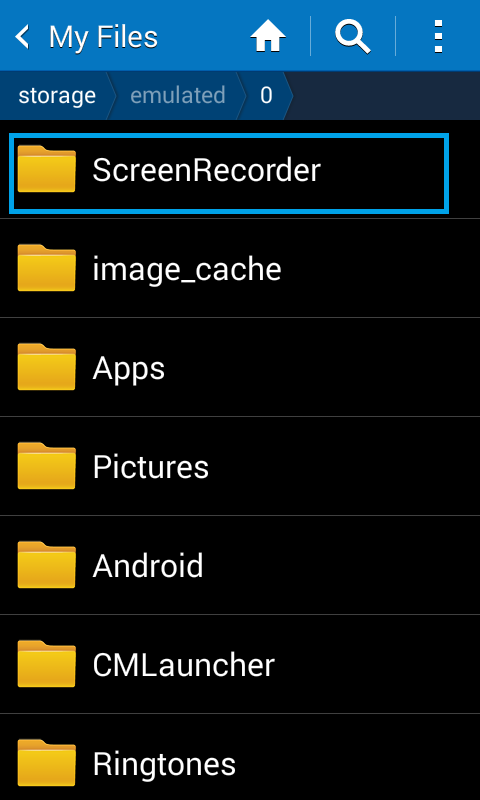
  4. To find your recorded video, go to your file manager and find ScreenRecorder folder.
Now that we're done with how to record your screen on an Android device, let's have a look at other features of this app.
  1. You can increase the speed of the recording from x2 to x10 by going to Settings>Time-lapse then select your preferred speed.
  2. You can set the Screen Orientation (land scape or portrait) by going to Settings>Orientation (this feature is only available for lollipop and above users).
  3. You can also change the video resolution by going to Settings>Resolution.
Hope this tutorial has helped you with  how to record your screen on an Android device? Share and please don't forget to subscribe to the site via email. We don't spam.


How To Unroot Your Android Device

Rooting an Android device is very beneficial. You can do all the great stuff - you get the best out of the device (check out 9 reasons why you should root your Android device) but the real problem arrives when you want to update your device Over The Air(OTA) - in this case, you'll need to unroot your device first. In this post, I will be taking you through how to unroot your Android device safely.

If you used SuperSU to root your phone, then open the SuperSU app head to Settings scroll down and tap Full unroot. When this is done, the phone will reboot and you'll be done with the unrooting process.

If you used Kingo root, tap the Settings button in the app, then tap Remove Root and confirm to Remove Root. When this is done, the phone will reboot and you'll be done with the unrooting process.
If you used any other method aside the two above, it doesn't mean you've lost hope. You can install an app called Universal Unroot to remove root from some devices. Note: The Galaxy Note 10.1, Galaxy MEGA, Galaxy S 4, Galaxy Note 2, and Galaxy Note 3 will not work with this app because of KNOX.

Hope this has helped you unroot your device? You can check out how to root your Android device here.

Google On The Move To Create A Password-Free Login System

"123456", "password", "android", "0000" are some of the most common passwords used by people all over the world - passwords can be really confusing no wonder we choose the easier ones which are easily guessed. Well, Google is trying to get rid of passwords forever.

Google on Tuesday confirmed it has invited a small group of users to help test a new password-free way to sign into their accounts. "'Pizza', 'password', and '123456' — your days are numbered," a Google spokesperson said in a statement.

The new system lets you verify your identity via your smartphone, according to Reddit user Rohit Paul, who first reported the experimental feature. It works like this: You go to log in to your Google account like normal, but instead of entering your email address and password, you provide just your email. Next, Google will provide a secret code — in Paul's case, the number 21 — and tell you to look at your phone.

The Web giant will then send a message to your phone asking if you're trying to sign in. If you answer "yes," you'll then need to provide the secret code on your phone and you'll be logged in immediately.

The test works on iOS and Android, and you can still log in with your regular typed password if you prefer, Google said.

Other companies such as Yahoo have already started the move to password-free using push notifications. There is much more hope with password free systems than passwords' - this is a saviour.

What is your thought on this?


WhatsApp To Add Video Calling Feature Soon

Less than a year ago, WhatsApp, the most popular Instant Messaging (IM) app which is available on Android, Windows, iOS and Nokia S40, Symbian and Blackberry devices added a voice calling feature to its app. Today, Macerkopf a German blog released a single picture alleged by him as an ongoing testing of a new feature which is will soon be added to the WhatsApp app. At the moment, there's is no confirmation that this is true but it isn't something impossible.

There isn't much regarding the User Interface of the video calling feature. It only has options to switch between the front and rear cameras or muting the microphone. This should work over WiFi and Mobile data.

Aside the video calling feature, it also seems the WhatsApp team is testing using browser-style tabs for quickly switching between multiple chats.

What do you think, will this feature make WhatsApp even better or there should be fear for lags and more? Let us know in the comment box.


The Samsung Galaxy A9 Is Finally Official

After weeks (if not months) of rumors and leaks this morning about the super-hyped Samsung Galaxy A9, Samsung has finally made official its new version of the A line of products.

This new Samsung "baby" ships with Android 5.1 Lollipop (can't tell why not 6.0 Marshmallow which was announced by google since May 2015). The other features that this phone comes with are quite nice. It sports a 6.0-inch AMOLED display with 1920 x 1080 resolution, a newly-renamed octa-core Qualcomm Snapdragon 652 processor, 3GB of RAM, 32 gigabytes of on-board storage, microSD card expansion up to 128GB and dual-SIM card support. It also has a 13MP rear camera with OIS, 8MP front camera, a pretty big 4,000mAh battery and support for Qualcomm’s Quick Charge. In typical Samsung fashion, there’s also a home button-mounted fingerprint sensor that brings along support for Samsung Pay.

This phone does not really hit the mark as expected examples being the low resolution and its shipping with Lollipop instead of Marshmallow but we hope the price will make up for it. At the moment, there isn't much information on availabily and pricing but considering the country in which it was made official (China), there is no doubt it will hit the shelves in China sooner than expected.

Are you happy about the A9, do you think it will be worth it considering the specs, let us know in the comment box.

Source: androidauthority